PLATFORMEverything in the system
One platform, seven working parts.
One database, one login, one map. Fuel knows where the vehicle is, maintenance knows what the odometer says, and a report can draw on all of it without anybody exporting a spreadsheet first.
01Live tracking· Command centre
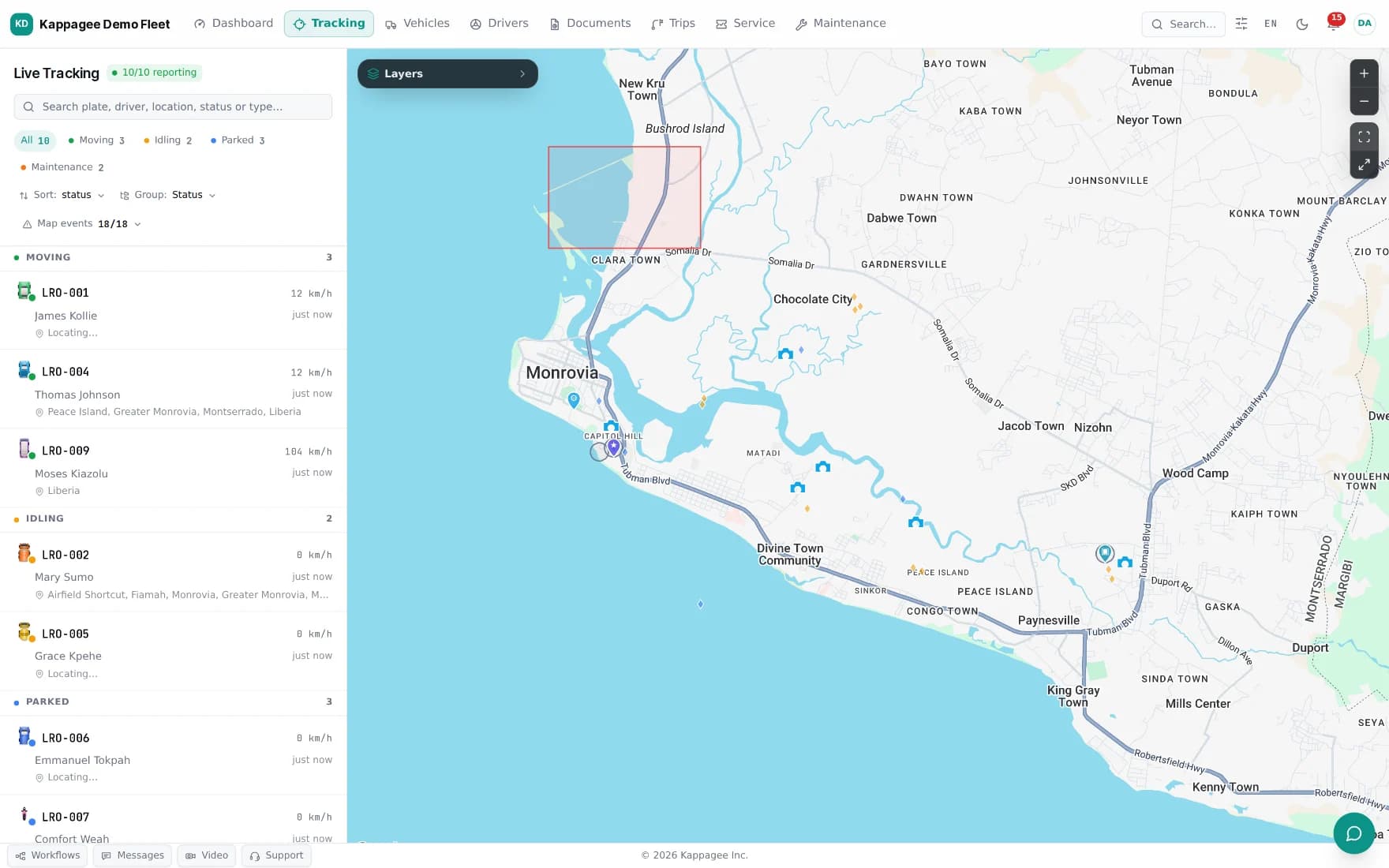
The map operators actually work in.
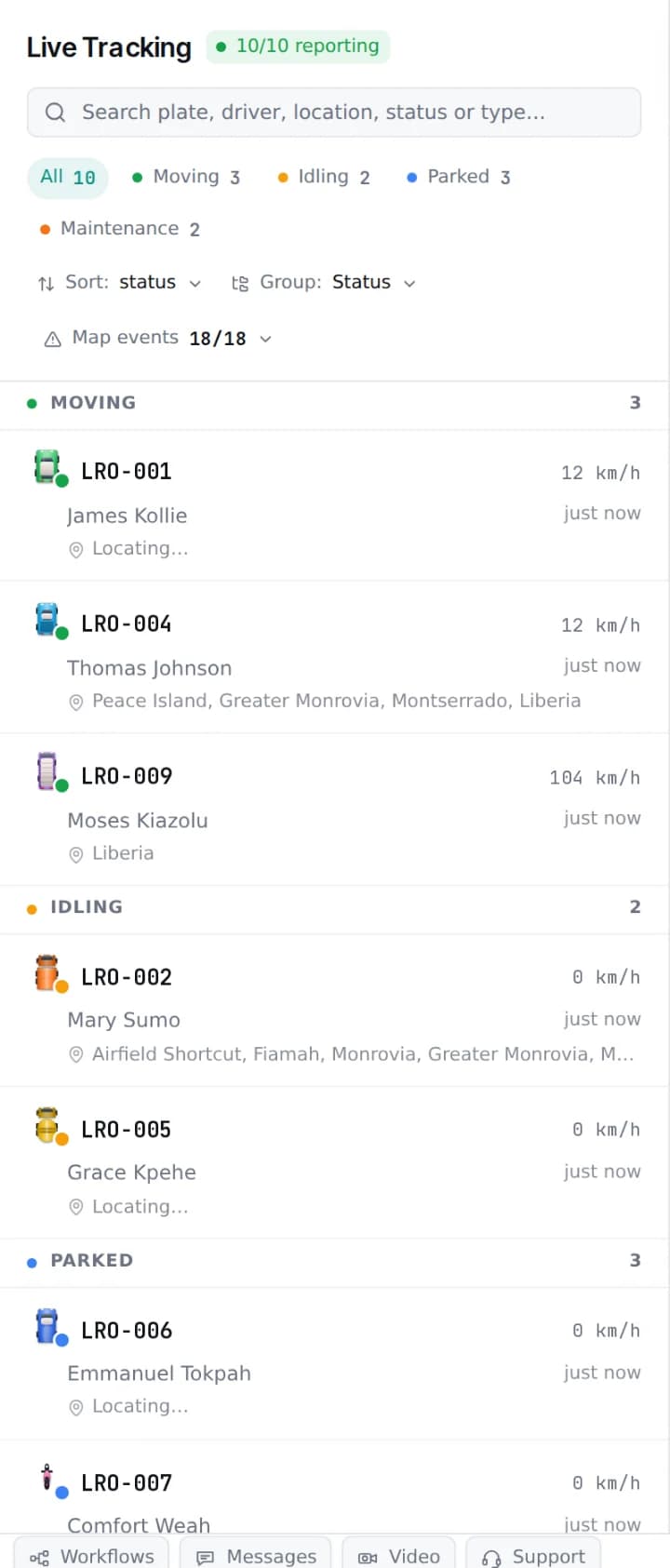
Positions arrive every one to three seconds and land on a single canvas. Everything an operator does next happens there too — no second screen, no context switch.
In the vehicle drawer
One click on a pin opens plate, VIN, asset id, driver and department; speed, heading, fuel level, engine hours, battery voltage and odometer; the current trip with distance, duration and average speed; and recent work orders with anything still open.
Commands, with the safety gates on
Follow a vehicle, replay a window, sound the buzzer, open a camera, or immobilise. Immobilisation refuses to run above 5 km/h or on telemetry older than five minutes, requires a typed reason, and writes the speed and position at the moment of the command into the audit log. A driver is never immobilised by surprise on the road.
Vehicle status, at a glance
The same seven states drive the sidebar filters, the wallboard, and every status count in reporting — one vocabulary across the platform.
Geofences
Four geometries
Circle
A centre and a radius. What a station or a depot usually needs.
Polygon
Any number of vertices, drawn on the map. For a compound or a yard.
Multi-polygon
Several disjoint areas treated as one zone — a site with separate parcels.
Route corridor
A buffer either side of a planned route. Leaving the corridor is the event.
Four event types
Entry / exit
Raised as the vehicle crosses, with the crossing time and position.
Dwell
Raised when a vehicle stays inside longer than the threshold you set.
Curfew
Presence or movement inside a forbidden window — the after-hours case.
Restricted zone
A hard alert on entry, for areas a vehicle should never be in.
A zone can be scoped to particular vehicles, so a depot curfew applies to the night shift and not to the whole fleet. Registering a partner fuel station creates its 200 m fuelling zone automatically — the same zone the authorization engine checks against.
02Integrated fuel· Fuel control
Fuel that knows where the vehicle is.
Cards, wallets, pumps and settlement sit in the same system as the telemetry, which is what lets the authorization engine read the vehicle’s position for itself while the driver is standing at the pump.
Cards
Physical and virtual
EMV chip-and-PIN cards for the vehicles that need them, and a QR card in the driver’s app for the ones that don’t. Assigned to a vehicle or to a driver. Blocking is immediate and reaches every POS.
Wallets
Prepaid or credit line
Top up in advance by Mobile Money, bank transfer or card, or run a post-pay credit line with a monthly invoice. Balances are held in the account’s own currency.
Stations
A real partner network
Partner stations run the POS app and their own back office: transactions, wet stock, shifts and settlement. Daily settlement pays each station its net, with Kappagee’s commission taken out first.
What you can set on a card
Ten controls, set per card or per policy. They are enforced at the pump, while the driver is standing there, not reviewed once the fuel is in the tank.
| Control | Type | Example |
|---|---|---|
| Per transaction | Amount cap | Max LRD 500 in one fill |
| Daily | Amount cap | Max LRD 2,000 a day |
| Weekly / monthly | Amount cap | Max LRD 40,000 a month |
| Volume per fill | Volume cap | Max 60 litres |
| Fuel type | Whitelist | Diesel only |
| Time of day | Schedule | Mon–Fri, 06:00–20:00 |
| Station | Geofence list | Approved stations only |
| GPS validation | On / off | Vehicle must be at the station |
| Odometer entry | On / off | Attendant must key the reading |
| PIN | On / off | Always required |
And what the platform notices on its own
Siphoning
A tank level that falls while the vehicle is stationary, raised from the fuel-level stream against your own drop threshold.
Fill discrepancy
A card that says fifty litres against a tank that rose by thirty. The difference is flagged with both readings.
Out-of-zone fuelling
A purchase away from an approved station, drawn on the map with the distance from where the vehicle actually was.
Your own tanks, counted the same way
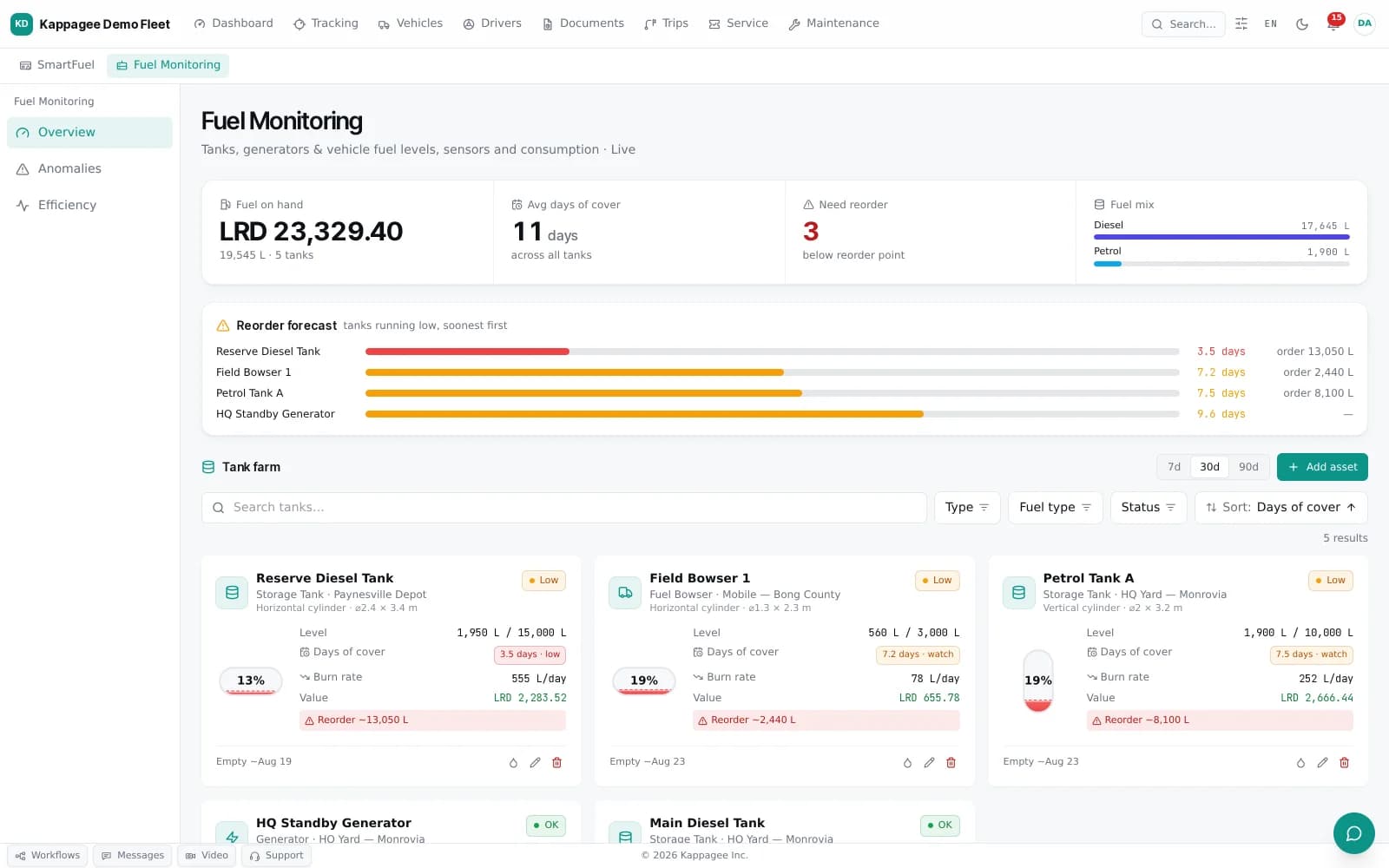
Depot tanks, bowsers and standby generators sit in the same fuel picture as the cards: level, burn rate, days of cover and the reorder each one needs. You order against a forecast, and nobody rings you from a dry yard.
03Safety & compliance· Driver safety
A score a driver can see, and argue with.
Events per 1,000 km over a rolling four-week window, on a 50–100 scale. A failed breathalyser test weighs twenty points, a harsh corner two. Drivers see the same numbers you do, in their own app.
Event weights
Coaching that closes
A score drop assigns coaching automatically, mapped to the weakness that caused it. The driver acknowledges it in the app, and the record shows who reviewed what and when — so a coaching conversation is evidence rather than a recollection.
Breathalyser testing
Scheduled, pre-trip or random tests over Bluetooth, with a photo taken during the test and the GPS position recorded. At or above 0.04% the trip is blocked until a supervisor overrides or the driver retests, and a critical alert reaches the operations feed.
Penalties, with the evidence attached
Deduction rules you configure, the underlying safety events inspectable behind every penalty, a dispute path for the driver, and a payroll export at the end of it.
04Maintenance & assets· Uptime
Servicing driven by the odometer.
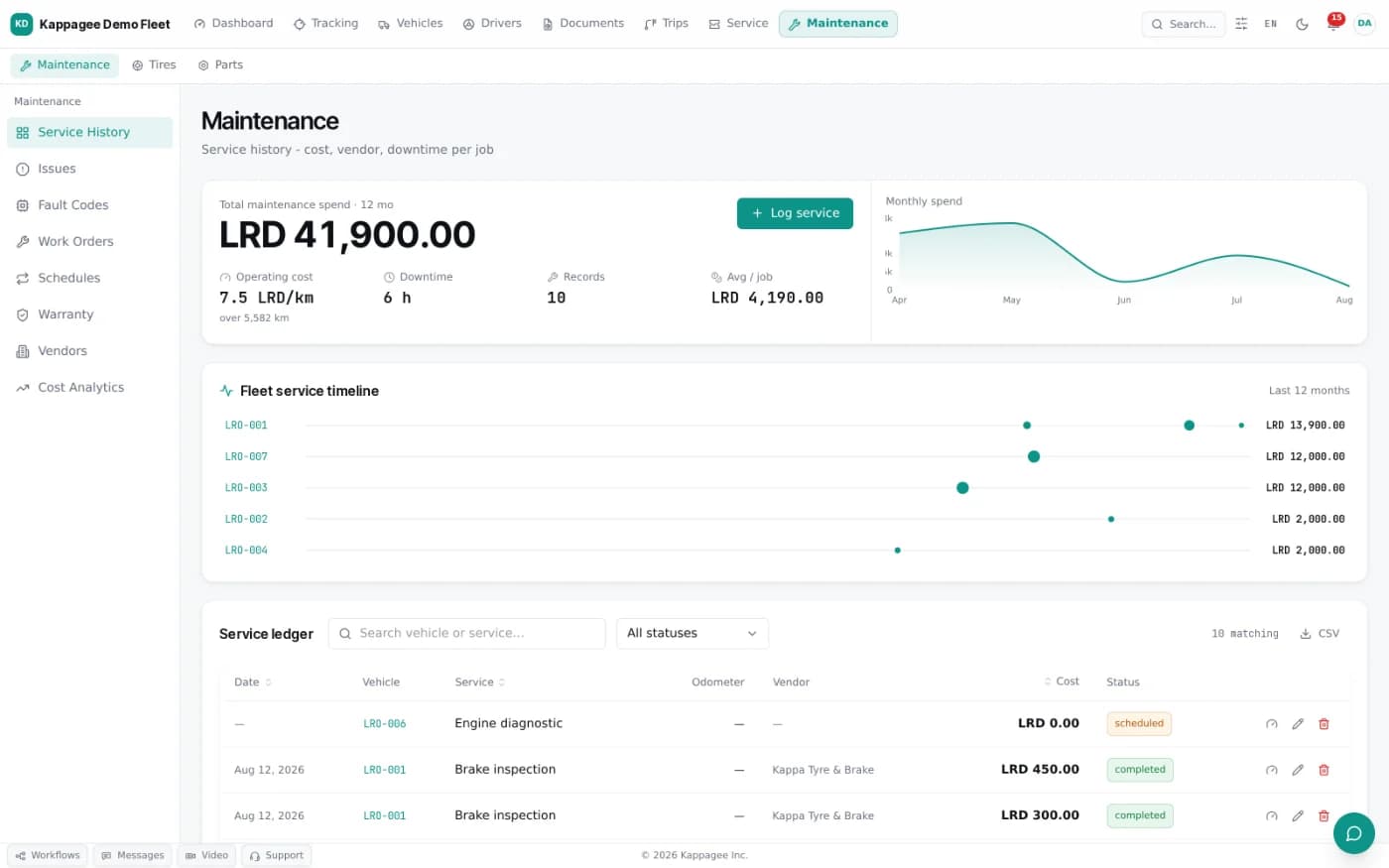
Schedules run on distance, engine hours or a date, taken from the vehicle itself. A pickup that did 4,000 km this month comes in before one that did 400, whatever the plan on the wall said.
Preventive schedules
Trigger on kilometres, engine hours or an interval. A daily sweep raises the due ones as alerts and opens the preventive work order itself.
Work orders
Preventive, corrective and accident repair, from open through parts, completion and verification, with labour and parts cost and the downtime it caused.
Fault codes
Diagnostic codes arrive with the telemetry and become a durable per-vehicle record — first seen, last seen, how many times, and at what odometer — decoded to a plain description.
Defect records
A failed inspection item, a driver report or an overdue service becomes an issue in its own right, promotable into a work order and closed automatically when that job completes.
Parts and vendors
Stock with reorder levels and low-stock alerts, a ledger of every movement, approved vendors, and the cost of a job assembled from both.
End of life
Decommission with an approval step and a final odometer, then disposal by auction or scrap, recorded with buyer and amount.
05Reporting & analytics· Answers
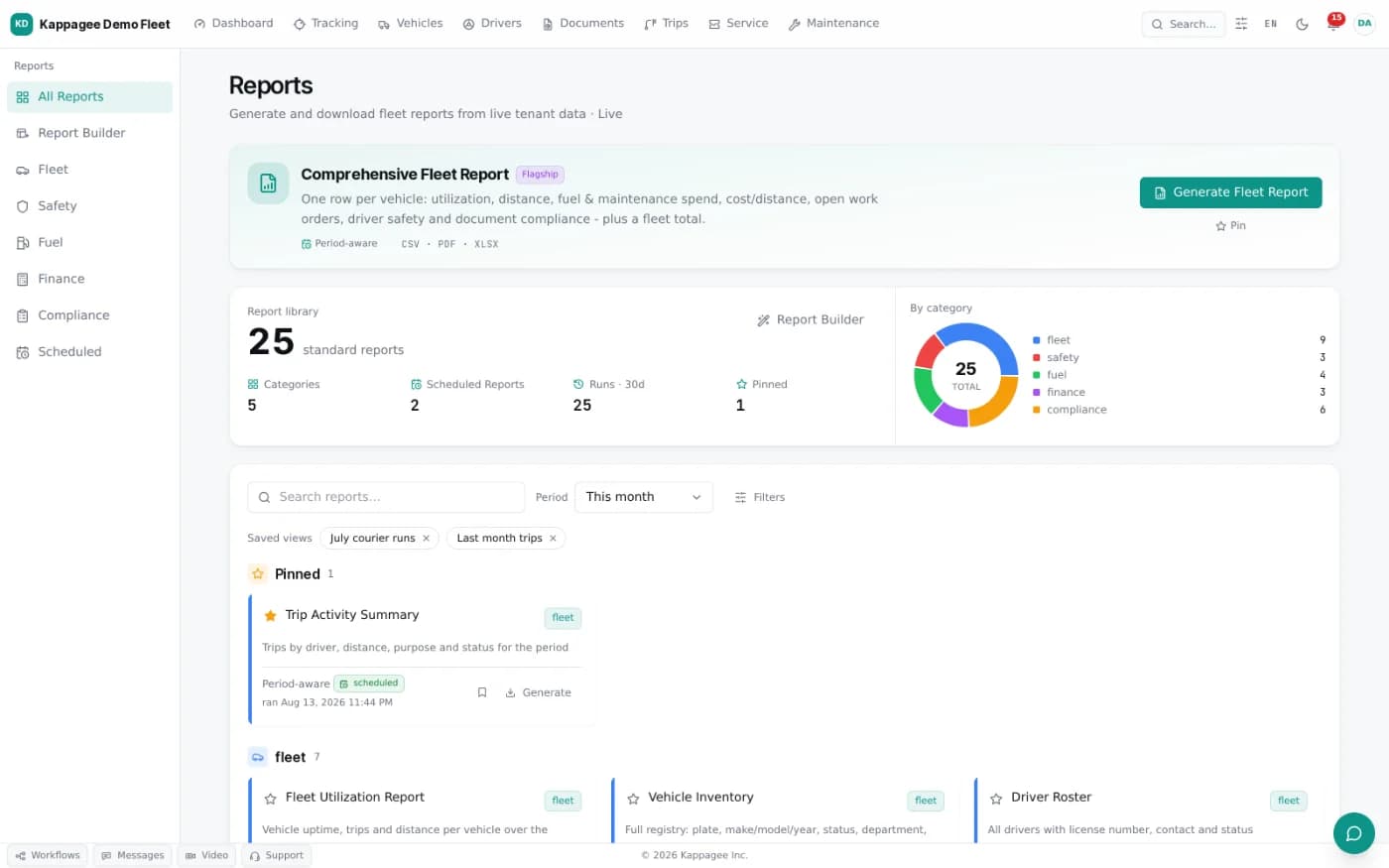
Twenty-one reports, and a builder for the twenty-second.
Every report runs live against your own data, over a period you choose, and downloads as CSV, Excel or PDF. The figures are queried when you press the button.
Standard templates include
- Fuel usage by vehicle
- Trip log summary
- Maintenance cost
- Driver violations
- Device uptime
- Work-order SLA
- Driver safety scorecard
- Fleet utilisation
- Geofence event log
- Penalty summary
- Document expiry status
Build your own, without SQL
Pick a domain, add filters and groupings, choose a visualisation, save it, and schedule it. The result honours the same tenant scope and role permissions as everything else, so a regional manager’s report contains their region and nothing more.
Scheduled delivery
Daily, weekly or monthly to a list of recipients, windowed to the cadence — a monthly report covers last month, not all of time — and attached in the format you picked.
Executive and donor view
A period-over-period summary with deltas: distance, fuel, cost per kilometre, estimated CO₂, safety, maintenance spend and a compliance snapshot — exportable to PDF for a board pack or a grant report.
06Field service· Field work
Dispatch it, prove it, measure it.
An optional module for utilities and service fleets, where the job is the unit of work rather than the trip.
Jobs created by hand, imported in bulk from CSV, or pushed in over the API.
Open jobs and available crews on one map, with the nearest crew and a road ETA suggested from live positions.
A configurable checklist, mandatory photos and a customer signature, each stamped with the position it was captured at.
A job marked complete where the vehicle’s GPS never reached the site is flagged for review rather than quietly filed.
Response and resolution measured against your targets, with the alert arriving while there is still time to make the deadline.
07Hardware & rails· Interfaces
It speaks to what you already have.
Trackers through a pluggable adapter layer, payments through the rails people actually use here, and an API for everything else.
Trackers
Teltonika, Concox and Queclink families, including the dual-SIM units common across the region. Telemetry arrives over MQTT or HTTP, and a device that has been offline uploads its buffer as a batch.
Payments
Orange Money, MTN MoMo and Airtel Money, bank transfer, and Visa or Mastercard, with idempotent provider callbacks so a retried payment cannot pay twice.
Integration
A scoped REST API with per-key rate limits, outbound webhooks, SCIM user provisioning from your identity provider, and a QuickBooks bridge for the finance ledger.
<200ms
Fuel authorization
<2s
Telemetry, end to end
<500ms
API, 99th percentile
99.9%
Uptime target
NEXTSee it on your fleet
Bring us a vehicle and a route.
Thirty minutes, your own vehicles on the map, and a fuel authorization resolving against GPS while you watch. Nothing to install first.
One loginOne databaseOne map